


Who says macro programs are useless? That's because you can't make it up!
Many CNC technicians nowadays do not understand macro programs. They believe that with automatic programming software, there is no need to learn macro programs. In fact, the functions of macro programs are very powerful. For example, when writing batch and repetitive programs, using macro programs only requires modifying a few data points, without the need for extensive repetitive programming. This can greatly simplify operations and improve work efficiency.
Macro programs can use variables for arithmetic operations, logical operations, and mixed operations of functions, and also provide loop statements, branch statements, and subroutine call statements.
Generally speaking, macro programs are suitable for programming series of parts with the same graphics but different sizes; Suitable for programming series parts with the same process path but different positional parameters; Suitable for curve programming without interpolation instructions such as parabolas, ellipses, hyperbolas, etc.
1.
Representation and Use of Variables
1, Variable representation
#I (I=1,2,3,...) or # [<Equation>]
Example: # 5, # 109, # 501, # [# 1+# 2-12]
2, The use of variables
1. Specify a variable number or formula after the address word
Format:<Address Word># I
The "I" here represents the variable number
Example: F # 103, if # 103=15, it is F15
Z - # 110, assuming # 110=250, it is Z-250
X [# 24+# 18 * COS [# 1]]
2. Variable numbers can be replaced by variables
Example: # [# 30], if # 30=3, it is # 3
3. Variables cannot use addresses O, N, I
Example: Under the following methods, it is allowed
O # 1;
I # 2 6.00 × 100.0;
N # 3 Z200.0;
4. The variable corresponding to the variable number has a specific numerical range for each address
Example: When # 30=1100, then M # 30 is not allowed
5. # 0 is an empty variable, and variables without defined variable values are also empty variables
6. Variable Value Definition:
Decimal points can be omitted when defining the program, for example: # 123=149
2.
Types of variables
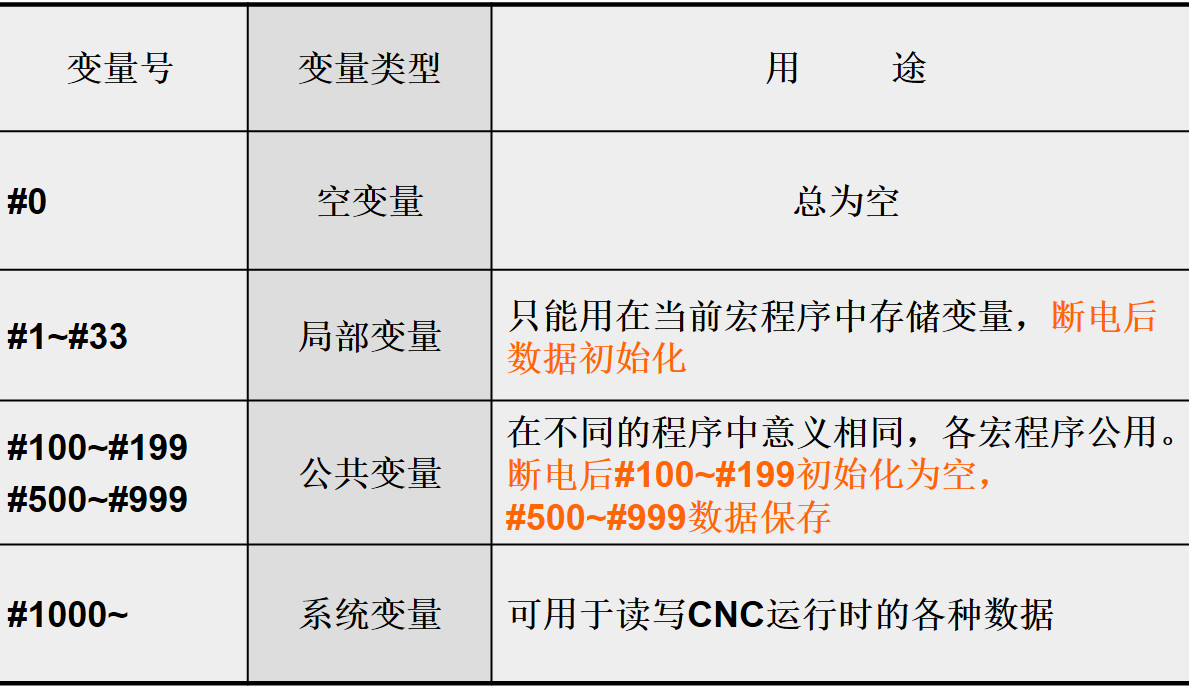
1. Local variables # 1~# 33
A variable that is used locally in a macro program, and its operation result cannot be used by other programs.
Example: A Macro Program B Macro Program
#10=20 X # 10 does not represent X20
Clear after power outage, input variable values when calling macro programs
2. Common variables # 100~# 199, # 500~# 999
The common variables within each user's macro program have the same operation result as any program call.
Example: In the previous example, when # 10 was changed to # 100, the B macro program
X # 100 represents X20
#Clear after power outage of 100~# 149
#500~# 531 Holding type variable (not lost after power outage)
3. System variables
A fixed purpose variable whose value depends on the state of the system
Example: # 2001 value is the X-axis compensation value for tool 1 compensation
#The 5221 value is the X-axis G54 workpiece origin offset value
When entering, a decimal point must be entered. If the decimal point is omitted, the unit is μ M
three
Arithmetic instruction
To the right of an expression can be constants, variables, functions, and formulas
In the formula, # j and # k can also be constants
On the right side of the equation are the variable number and the expression
1, Definition
#I=# j
2, Arithmetic operation
#I=# j+# k
#I=# j - # k
#I=# j * # k
#I=# j/# k
3, Logical operation
#I=# JOK # k
#I=# JXOK # k
#I=# JAND # k
4, Function
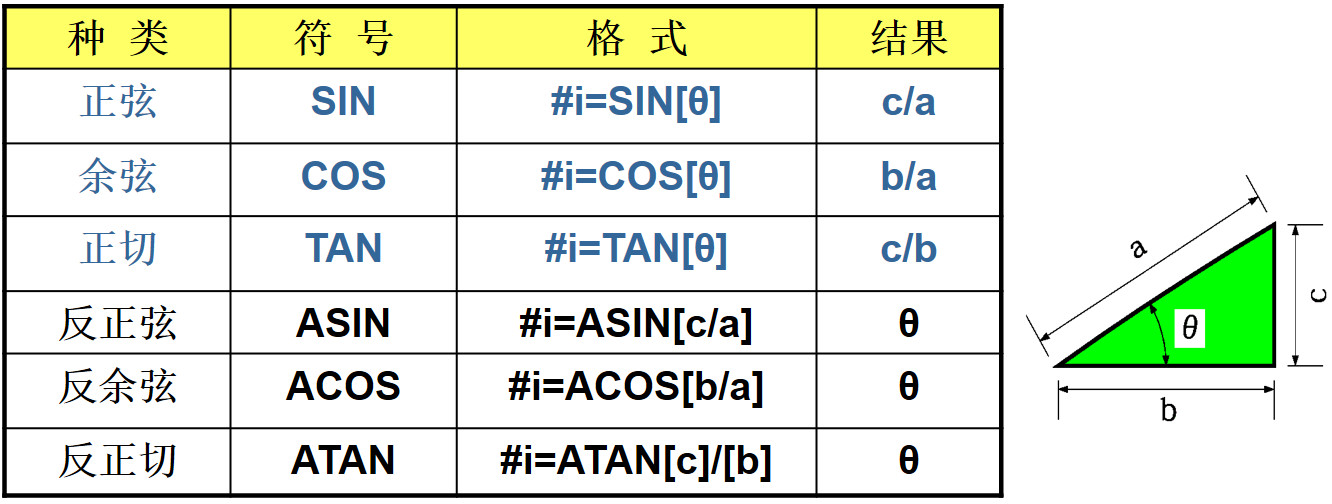
#I=SIN [# j] sine
#I=COS [# j] cosine
#I=TAN [# j] tangent
#I=ATAN [# j] arctangent
#I=SQRT [# j] square root
#I=Absolute value of ABS [# j]
#I=ROUND [# j] Round to nearest whole number
#Round I=FIX [# j]
#Round I=FUP [# j]
#I=BIN [# j] BCD → BIN (binary)
#I=BCN [# j] BIN → BCD
1) Angle in degrees
Example: 90 degrees and 30 minutes are equivalent to 90.5 degrees
2) The two side lengths after the ATAN function should be separated by "/"
Example: When # 1=ATAN [1]/[-1], # 1 is 35.0
3) ROUND is used for addresses in statements, rounded to the smallest set unit of each address
Example: Set # 1=1.2345, # 2=2.3456, and set unit 1 μ M
G91 X - # 1; X-1.235
X - # 2 F300; X-2.346
X [# 1+# 2]; X3.580
Not returned to its original location, should be changed to
X [ROUND [# 1]+ROUND [# 2]];
4) If the absolute value after rounding is greater than the original value, it is rounded up; otherwise, it is rounded down
Example: When # 1=1.2, # 2=-1.2
If # 3=FUP [# 1], then # 3=2.0
If # 3=FIX [# 1], then # 3=1.0
If # 3=FUP [# 2], then # 3=-2.0
If # 3=FIX [# 2], then # 3=-1.0
5) When instructing a function, only the first two letters can be written
Example: ROUND → RO
FIX → FI
6) Priority
Function → Multiplication and division (*, 1, AND) → Addition and subtraction (+, -, OR, XOR)
Example: # 1=# 2+# 3 * SIN [# 4];
7) Brackets are square brackets, up to 5 times, used for commenting statements
Example: # 1=SIN [[[# 2+# 3] * # 4+# 5] * # 6]; (Triple)
four
Transfer and Loop Instructions
1. Unconditional transfer
Format: GOTO n;
Unconditionally transfer to program segment n
n: Program segment number (1-99999)
N can also be replaced by variables or expressions
GOTO10;
GOTO # 10;
2. Conditional transfer
IF [<conditional expression>] GOTO n;
If the<conditional expression>is met, the next step is to transfer to the program segment with segment number n.
If not satisfied, execute the next program segment.
IF [<conditional expression>] THE;
If the<conditional expression>is met, execute only one macro program statement after THEN.
IF [# 1EQ # 2] THE # 3=0;
Conditional formula:
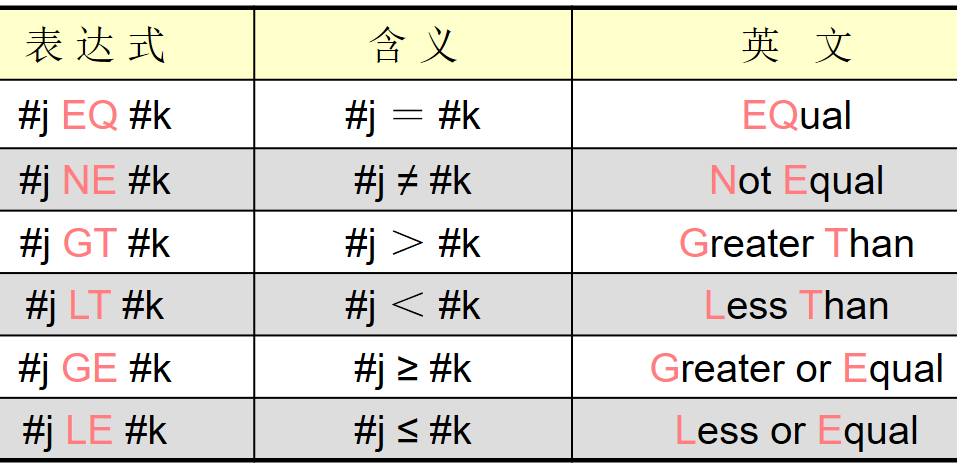
#J and # k can also be replaced by<expression>
Example: IF [# 1 GT 10] GOTO 100;
N100 G00 G91 X10;
Example: Finding the sum of 1 to 10
O9500;
#1=0
#2=1
N1 IF [# 2 GT10] GOTO 2
#1=# 1+# 2;
#2=# 2+1;
GOTO 1
N2 M30
3. Cycle
Format: WHILE [<conditional>] DO m; (m=1, 2, 3)
ENDm
When the conditions are met, execute from DOm to ENDm, then from the program segment of DOm
When not satisfied, execute the program segment after ENDm
If the WHILE statement is omitted and only DOm... ENDm is present, a dead loop is formed between DOm and ENDm
3. Nesting
When EQ NE is present, the null and "0" are different
Under other conditions, null and "0" are the same
Example: Finding the sum of 1 to 10
O0001;
#1=0;
#2=1;
WHILE [# 2LE10] DO1;
#1=# 1+# 2;
#2=# 2+# 1;
END1;
M30;


