


CNC machining equipment fault diagnosis and maintenance strategy
This article mainly introduces the fault diagnosis and repair methods of CNC machining equipment such as vertical drilling centers, CNC lathes, and CNC milling machines. These faults are commonly encountered in daily production, including mechanical and electrical aspects. This article provides a targeted explanation of various fault diagnosis and maintenance methods in a simple and concise manner, which is worth learning from by colleagues in CNC maintenance.
summary
CNC machining equipment mainly includes vertical drilling centers, CNC lathes, CNC milling machines, and CNC punching and shearing machines. The operating principle of this type of equipment is based on the part processing program and operation instructions formulated according to the production process, which are processed and processed by the numerical control device (CNC) through corresponding digital logic operations. After that, one-on-one processing control instructions are output to control the coordinated action of various moving parts of the equipment and process parts that meet the requirements. This type of equipment has the characteristics of high accuracy, reliable system operation, and precise output instructions, but it is difficult to diagnose and repair after a malfunction occurs. This article mainly summarizes the fault diagnosis and repair methods of several CNC machining equipment in our unit's daily work process, providing ideas for equipment repair colleagues to handle similar faults.
Fault diagnosis and repair of vertical drilling center
The vertical drilling and tapping center mainly performs drilling, threading, and simple flat milling on workpieces. It generally consists of a spindle, a worktable that can move in the X and Y directions (some places call it a cross slide table), a tool magazine, and the A-axis. The phenomenon of tool magazine faults is very common. Below, the diagnosis and repair methods for tool magazine faults are described.
(1) Fault phenomenon. A vertical drilling center, model TC500, cannot execute tool change instructions during the machining process. In automatic mode, when the program executes tool change, the tool magazine does not move, the system does not alarm, and the tool change action is not executed in manual mode.
(2) Fault diagnosis and analysis. According to the diagnosis of the operating principle of the vertical machining center, after analysis, it is believed that the main causes of this fault phenomenon are: ① loss of tool position detection signal. ② The tool change signal is incorrect. ③ The Z-axis coordinate reference point is missing. ④ The system did not detect the travel of the spindle (Z-direction) at the tool change point position. ⑤ The distance between the lower end face of the spindle and the workbench is incorrect. ⑥ The magazine motor is not activated.
(3) Troubleshooting and repair. Regarding ① opening the system ladder diagram (see Figure 1 and Figure 2) and using a metal plate to sense the tool position detection switch, it was found that the detection switch signal was consistent with the action of the program contact X9.6 in the ladder diagram. Therefore, the fault ① was ruled out; Regarding ②, after writing the tool change command in manual (MDI) mode, it was detected that the tool change relay was functioning normally and the frequency output of the tool change frequency converter was available. Therefore, the fault ② was eliminated; To reset the Z-axis coordinate reference point for ③, that is, when using the handwheel to move the Z-axis to the mechanical coordinate value of Z=130, change the value corresponding to APC (Z) in parameter 1815 to "0", then power off the machine and restart it. Change the value corresponding to APC (Z) to "1", and even after the machine is powered off and restarted, the tool magazine still does not execute the tool change command. Therefore, troubleshooting ③; Open the system ladder diagram to check if the signal of the tool change point position is normal, therefore troubleshoot ④; When adjusting the distance between the lower end face of the spindle and the workbench using a handwheel, and measuring the linear distance between the lower end face of the spindle and the workbench with a ruler to reach 540mm, the "0" position of system K parameter 15 is modified to 1. Even when the machine tool is powered off and restarted, the tool magazine still does not execute the tool change command. Even when the distance is adjusted to 535mm, 530mm, and 520mm, it still does not work. Therefore, troubleshooting ⑤; Regarding the dismantling and careful inspection of the motor for the tool magazine ⑥, it was found that all the power lines of the motor were disconnected at the terminals due to aging. The disconnected power lines were reconnected and the tool magazine was able to replace the tool normally during trial operation.
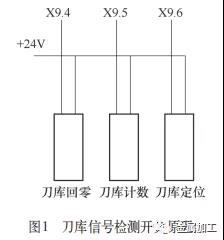
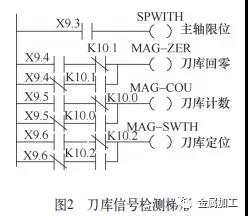 After investigation, the fault was caused by the power cord being stuck and pulled off by the rotating cutterhead during the tool changing process of the tool magazine. Therefore, after connecting the power cord, fix it firmly to prevent such a phenomenon from happening again.
Diagnosis and repair of CNC lathe faults
CNC lathes are generally composed of X - and Z-direction moving workbenches, spindles, and other work units, mainly completing tasks such as turning and boring workpieces. There are many types of faults, including spindle electrical control and electric tool holders. Below, a typical electrical system fault diagnosis and repair will be explained.
(1) Fault phenomenon. A inclined guide CNC lathe, model HTC2050i, experienced a sudden malfunction during the machining process, and the CNC system alarm message was: NO.2121 hydraulic motor power control switch tripped; NO.2123 hydraulic motor not started; NO.2130 chuck pressure is low. After investigation, a single-phase DC 24V control circuit breaker in the electrical control cabinet tripped. If the tripped circuit breaker is forcibly closed, the CNC device will black out, and the power indicator light on the DC power board will flicker.
(2) Fault diagnosis and analysis. Based on the system alarm information and analysis of the equipment operation principle, it is believed that the main causes of this fault phenomenon are: ① The hydraulic station motor has malfunctioned. ② The pressure relay for detecting hydraulic chuck pressure has malfunctioned The DC 24V power supply of the relay board has a short circuit fault.
(3) Troubleshooting and repair. Regarding the inspection of the hydraulic station motor, the hydraulic system circuit is shown in Figure 3.
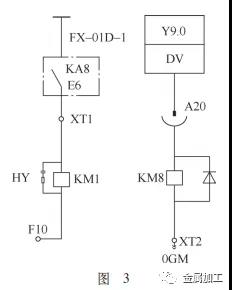
Using a megohmmeter to test the hydraulic station motor, the results were normal. The motor was directly connected to the lower end of the control power switch, and after closing, the hydraulic motor could start normally. Therefore, the fault ① was eliminated; Regarding the inspection of the hydraulic chuck pressure relay SP3, the chuck control circuit is shown in Figure 4. After measurement, the pressure relay signal is normal. The power line of the pressure relay is unplugged from above the relay. After turning on the machine, the above alarm information still exists. Therefore, the fault ② is ruled out; Regarding ③, first check the circuits at both ends of the tripping circuit breaker, measure its control voltage, and after testing, the upper circuit is normal, while the lower+24V power supply is short circuited to ground. After checking the connection between the lower end and the relay board, use a multimeter to check the condition of each+24V power supply on the relay board, and it is found that all circuits are short circuited to ground. As all limit and measurement signals are+24V power supplies, and there are hydraulic monitoring contacts on the circuit breaker, First, check if the hydraulic monitoring contacts are normal.
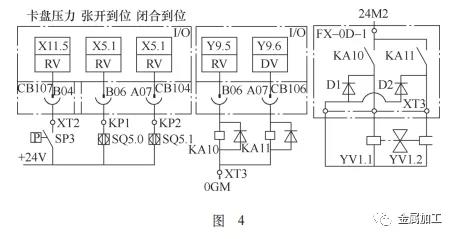
Remove the other end of each terminal connected to the+24V power supply from the relay board, and use a multimeter to test one by one. It was found that XT3 terminal was short circuited to ground, causing each+24V power supply to be short circuited to ground (because all+2 4V power supplies are connected together on the relay board, any short circuit to ground in the connecting line will cause a short circuit to ground in all+24V power supplies). After inspection, it was found that XT3 terminal is the expansion detection signal line of the chip conveyor device, Opening the protective cover, it was found that the signal wire was entangled with the expansion wheel, which rotated with the chip removal motor and pulled the signal wire apart. The disconnected signal wire and 24V power supply were short circuited to ground through the bed, resulting in the above-mentioned fault. After restoring the damaged signal line, the fault was resolved, and the machine tool ran normally. Fix the signal line firmly to prevent such phenomena from happening again.
Fault diagnosis and repair of CNC milling machines
CNC milling machines are generally composed of workbenches, spindles, and other working units that move in the X and Y directions. They mainly complete tasks such as milling holes, grooves, and grooves on workpieces. There are many types of faults, including electrical control and mechanical ones. Below, we will explain the diagnosis and repair of a typical electrical fault that cannot return to the working zero point.
(1) Fault phenomenon. A CNC milling machine, model CK7136, is controlled by Shandong Kandi (KND) CNC system. During the startup and use of the zero return process, the X, Y, and Z directions cannot return to zero, and the system alarms:+X,+Y,+Z all exceed the range.
(2) Fault diagnosis and analysis. Based on the system alarm information and the analysis of the equipment operation principle, it is believed that the main causes of this fault phenomenon are: ① Failure of the limit switch in all directions. ② Fault occurs in the limit circuit in all directions. ③ System parameters have changed.
(3) Troubleshooting and repair. Regarding the on/off detection of limit switches in various directions, it was found that the X and Y direction limit switches were normal, and there was no signal for the deceleration detection gear of the Z direction limit switch. Upon inspection, it was found that the deceleration gear of the Z direction limit switch could not be effectively closed or released. After replacing the Z direction limit switch, click the "Diagnosis" button on the CNC device to enter the diagnostic interface, manually move in all directions, and check the parameters X000, X001, and X002 corresponding to the X, Y, and Z directions, respectively, Check if there is any change in the first four binary digits of each corresponding number from left to right. It was found that only the Z direction can respond effectively, and the X and Y direction limit switches are normal, but still cannot return to zero. Therefore, troubleshoot ①; Regarding the inspection of the circuit from the X and Y limit switches to the CNC system, it was found that the circuit aged due to prolonged use and immersion in oily cutting fluid, causing the insulation skin of the X and Y circuits to peel off. In addition, the X and Y circuits were fixed together and moved with the workbench, resulting in a short circuit between the circuit and the equipment body. After processing the X and Y circuits, the CNC system diagnosed them and found that the X, Y, and Z circuits were all normal, But it still cannot return to zero, so troubleshoot ②; Regarding the "Parameter" key on the CNC device (CNC) at point 3, enter the parameter interface and search for parameter "0015". The following prompt is: POD GB4S FXC0 FXCS... ZRSZ ZRSY ZRSX Check if its parameter is "01000111". This parameter is the zero point setting value in the X, Y, and Z directions, and it is found that it is "01000001", which is obviously incorrect and needs to be adjusted.
The adjustment method is as follows: click the "Settings" button on the CNC device to enter the parameter setting surface, move the cursor down to the "Parameter Switch" position, click the "Right" arrow on the CNC device keyboard to turn on the "Parameter Switch", then click the "Parameters" button to enter the parameter setting interface, move the cursor to parameter 0015, change the login method to "Enter" status, and enter "01000111" in the numerical setting box below, Click the "Enter" button on the CNC device panel, then turn off the parameter switch, reset the alarm information, turn off the equipment power, restart the machine tool to perform various directions of zero return, the machine tool runs normally, and the fault is resolved.
This fault type is a typical fault that occurs in both the hardware of the limit switch and the loss of system zero parameters. The occurrence of this fault is due to the aging of the insulation skin of the limit circuit, which causes a short circuit during the return to zero process, resulting in the loss of system zero parameters and the occurrence of the above fault. After such faults occur, hardware faults should be eliminated first, and then software faults related to system parameters should be eliminated.
epilogue
In summary, CNC machining equipment is a device that integrates digitization, intelligence, and specialization. Its fault diagnosis and maintenance work is relatively complex. Therefore, while requiring fault maintenance personnel to master relevant theoretical knowledge, they also need to have rich practical experience. This requires a clear understanding of the structure and operating functions of each CNC machining equipment, and being good at analyzing and judging faults according to the operating principles of CNC machining equipment when dealing with fault problems. Only then can targeted troubleshooting be further carried out, effectively solving the fault problem and achieving the effect of drawing inferences from one example to another.


